




November 12, 2026
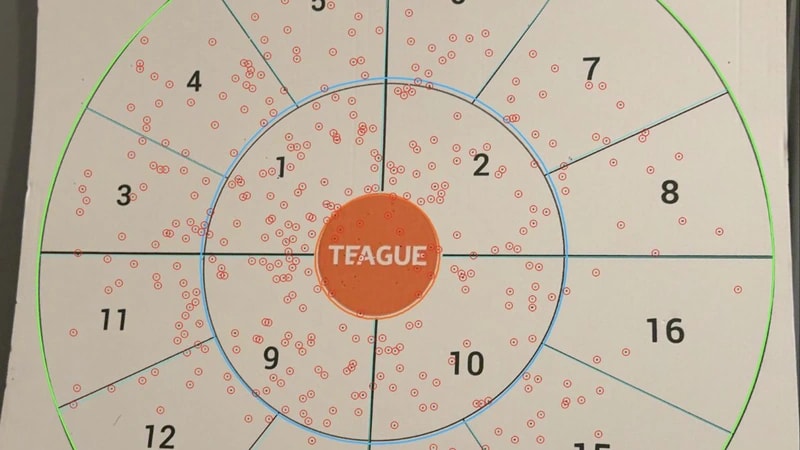
We built a bespoke web app using computer vision to detect pellet marks on Teague Printed shotgun targets. As a Progressive Web App (PWA), it installs in seconds from the browser on supported desktop and mobile devices. Users can analyse their targets and see how different chokes affect their results.
The app saves results in a library to help users choose the right choke. It shows pellet spread, regional counts and annotated images. The handy app will keep Teague in the hands of its existing and soon-to-be customers.

We started by looking for an existing solution
We looked for an existing computer-vision solution that could count marks on Teague’s printed cards, but found no suitable fit. The challenge was separating marks from rings, dividers, lettering and shadows in everyday photographs, while returning a result users could check.
Our Computer vision service
Our Python service combines OpenCV for image processing, NumPy for matrix calculations and FastAPI for the analysis endpoint. For Teague’s printed cards, it fits an ellipse to the outer ring and uses the inner ring and dividers to correct tilt and rotation. A 3 × 3 projective transform (homography) maps the photograph into a consistent reference view; its inverse maps detected positions back onto the original image.
Mark Identification
OpenCV estimates the local paper brightness using morphological closing, then measures each pixel’s relative contrast: (B − I) / max(B, 1), where B is the estimated background and I is the pixel brightness. Connected-component analysis groups dark pixels into candidate pellet marks; area, shape and nearby printing help filter them. On these cards, each accepted mark is assigned to a printed region using its distance from the centre and the card’s divider geometry.
Analysis results
PatternPro shows detected positions, regional counts and annotated images together so users can check the result against the photograph. The overlays also help us trace missed marks or misplaced boundaries during development, while independently reviewed counts support accuracy checks.

What the app gets back
The service returns JSON the app can display and save: total_marks is the detected total, counts groups marks by region (0 is the centre), and marks holds each mark’s image coordinates, area, region and normalised position. Here is an example response.
A PWA puts the workflow on the phone
Built as an Angular Progressive Web App (PWA), PatternPro works in the browser and can be added to the home screen on supported devices. Users can upload a photograph, record its details and inspect the analysis in one place. Processing runs in the remote Python service and requires an internet connection.
Technical breakdown
Firebase Authentication handles Google and email sign-in, while Cloud Firestore stores saved analyses and reusable configurations so users can revisit results without repeating setup. The Angular frontend runs on Cloudflare Pages, and the Python analysis service runs on Railway, checking Firebase sign-in tokens before processing requests.
We build practical applications
If your team works with images, printed material or repetitive visual checks, talk to Develo about turning that workflow into a practical application.
Last updated: November 13, 2026